Latest Boomer WP Plugin Download
- Step 1:
- Click 'Download' and the plugin as a zip file will download to your computer.
- Step 2:
- Go to your website and go into the plugins. Click on 'Add Plugin'
- Step 3:
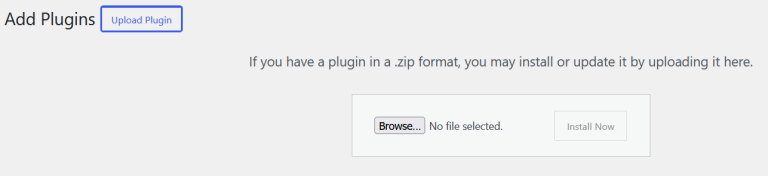
- Add the plugin by clicking on 'Upload Plugin'
- Step 4:
- Upload the plugin zip file to your WordPress
- Step 5:
- Activate the plugin.
- Go to to set-up which types of posts are handled by the Boomer WP plugin.
- Step 6:
- When you first use the plugin, the Boomer WP will set-up your linkage to the Optimize function.
imunify-bot-check